Back when I wrote about self-hosting an LLM with Ollama and Continue.dev, I mentioned keeping privacy and security concerns somewhere in the back of my mind. Since then I've gotten pretty comfortable with Claude Code as a daily driver — to the point of writing about custom slash commands and building a plugin marketplace around it. So when I stumbled across OpenCode, I was curious enough to actually sit down and try it.
This isn't a full migration post. I haven't committed either way. But I spent enough time with it to have opinions, and I wanted to write them down.
First Impressions
OpenCode is an open-source AI coding assistant that runs entirely in the terminal. The setup is familiar: you get a TUI, you point it at a project, you start talking to it. The first notable difference is initialization — instead of a CLAUDE.md, OpenCode generates an AGENTS.md file during /init. Same idea: a project-level markdown file that gives the AI context about your codebase, conventions, and structure.
The renaming is purely cosmetic. The concept is identical. You write instructions, it reads them. If you already have a well-tuned CLAUDE.md, porting it over is just a copy-paste.
Commands, Skills, and the Workflow I Cared About
The main thing I needed to verify before taking OpenCode seriously was whether my existing workflow would carry over. Most of what makes Claude Code actually useful for me day-to-day lives in custom slash commands and skills — prompt modules that handle recurring tasks like code review, blog drafting, and component scaffolding.
Good news: OpenCode has both, and they work almost exactly the same way.
Commands
Custom commands in OpenCode live in .opencode/commands/ at the project level, or ~/.config/opencode/commands/ globally. Each command is a markdown file with optional YAML frontmatter:
---description: Run a thorough code reviewagent: defaultmodel: anthropic/claude-3-5-sonnet-20241022---Review the staged changes in this PR. Check for correctness, edge cases, and adherence to the project conventions in AGENTS.md. $ARGUMENTS
The filename becomes the slash command: code-review.md → /code-review. You can use $ARGUMENTS, $1, $2 as placeholders, inject shell output with backtick syntax, and reference files with @filename. Structurally it's the same format as Claude Code commands in .claude/commands/.
Skills
Skills work nearly identically to how they do in Claude Code. A skill is a SKILL.md file with YAML frontmatter sitting inside .opencode/skills/<name>/. The agent discovers available skills on-demand and loads the full content only when needed:
---name: blog-postdescription: Create a new MDX blog post from a draft file---Check content/draft.md for the blog brief. Write a new post to content/blogs/...
OpenCode also searches .claude/ and .agents/ compatible directories automatically, so if you already have Claude Code skills set up, there's a decent chance OpenCode will just pick them up without moving anything.
The Actual Selling Point
All of that is table-stakes compatibility. The reason OpenCode is interesting is something else: it supports any AI provider.
That includes Anthropic, OpenAI, Google, and — critically — self-hosted Ollama. I already run an Ollama instance locally. Being able to point an AI coding assistant at it is genuinely useful for a few reasons:
Privacy-sensitive work. When I'm in a codebase with credentials or internal tooling I'd rather not send through a third-party API, a local model is the right call.
Uncensored models. This sounds more scandalous than it is. The actual use case that came up for me: I asked a public model to generate a Code of Conduct markdown template and it refused. An uncensored local model just... does it. That's the whole situation. (I'll also admit the joke in my draft notes about "nsfw reasons" — I left it in the draft. You can use your imagination.)
Cost. No tokens, no metering, no waiting for rate limits to reset.
Adding Ollama as a provider takes about ten seconds. OpenCode uses ~/.config/opencode/opencode.jsonc for global config, and Ollama goes in the provider block. Since Ollama exposes an OpenAI-compatible API, it uses the @ai-sdk/openai-compatible package under the hood:
{"$schema": "https://opencode.ai/config.json","provider": {"ollama": {"npm": "@ai-sdk/openai-compatible","name": "Ollama (local)","options": {"baseURL": "http://localhost:11434/v1",},"models": {"llama3.2": {"name": "Llama 3.2",},"deepseek-r1": {"name": "DeepSeek R1",},},},},}
Whatever models you have pulled in Ollama, you add them under models with any display name you want. Then you can switch to them mid-session with /model. One thing worth noting from the docs: if tool calls aren't working reliably, bump num_ctx in Ollama to at least 16k–32k. The default context window is too small for the kind of multi-step tool use a coding agent needs.
The UX Is Just Better
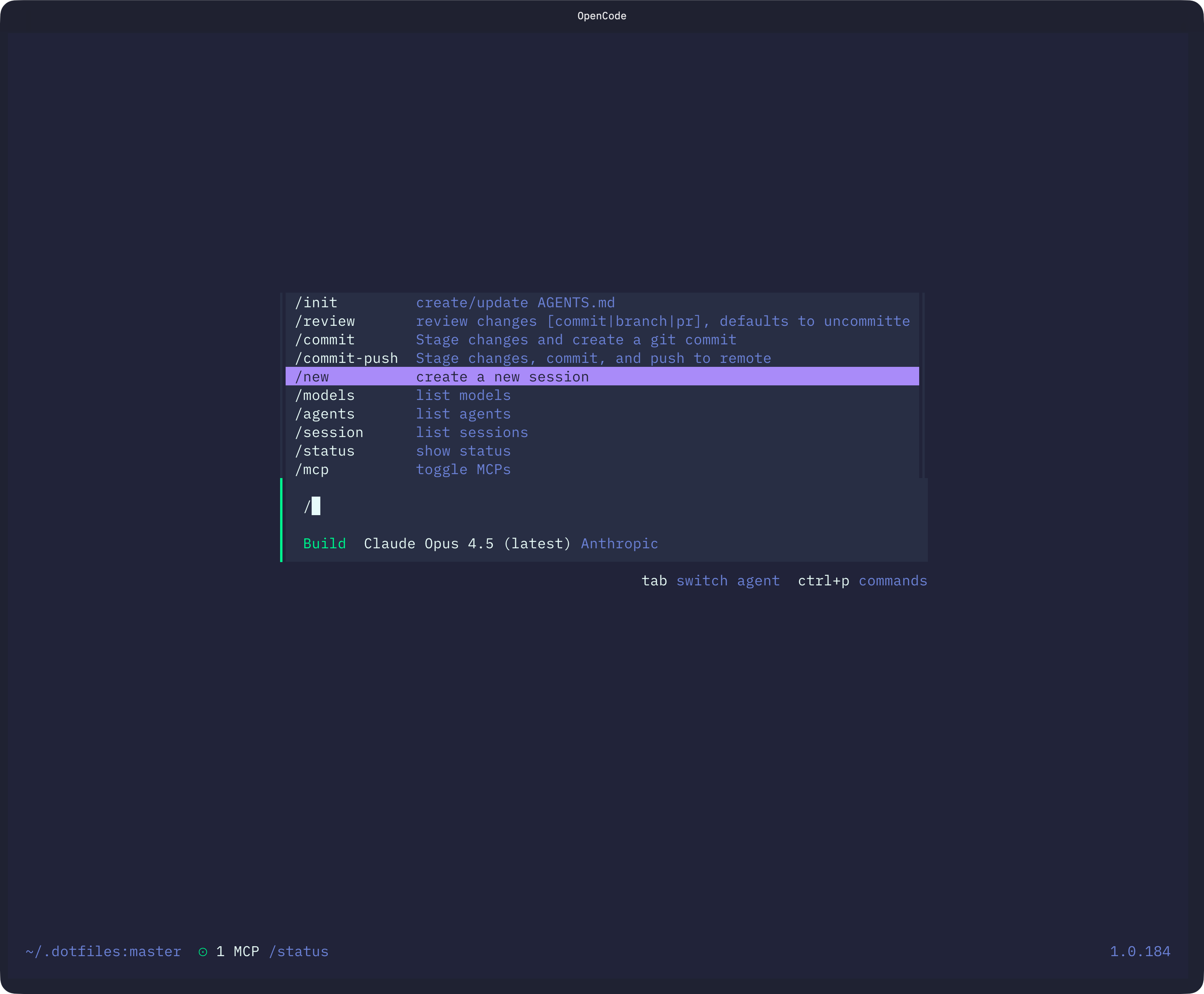
The TUI is more polished than Claude Code's. There's a Plan mode (toggled with Tab) that puts the agent in a read-only, suggestion-only state — useful when I want analysis without accidental file edits. You can drag images into the terminal. The overall feel is that someone spent real time on the terminal experience, not just the AI layer underneath it.
Theming is a first-class feature. OpenCode ships with a solid set of built-in themes — Tokyo Night, Catppuccin, Gruvbox, Nord, Kanagawa, and more. You can set one with the /theme command inside the TUI, or lock it in config via a tui.json file at ~/.config/opencode/tui.json:
{"$schema": "https://opencode.ai/tui.json","theme": "tokyonight"}
If you want something custom, themes are just JSON files. Drop a mytheme.json into ~/.config/opencode/themes/ for global use or .opencode/themes/ for per-project, and it gets picked up automatically. The schema has sections for defs (reusable color aliases) and theme (assignments for specific UI elements like primary, text, background, syntaxKeyword, diffAdded, etc.), with support for separate dark and light variants. It's the kind of thing that feels minor but makes a real difference when you're staring at a terminal for hours.
The Problem
Here's where it falls apart for me right now: OpenCode requires a Claude API key to use Anthropic models. I'm on the Claude Pro subscription, which is the web and desktop plan — not the API. Those are separate products with separate billing.
I looked into it. To use Claude through the API, I'd need to set up a separate API account and pay per token on top of my existing subscription. I'm not doing that just to use an open-source wrapper around the same model I'm already paying for.
Apparently the ability to use the Claude subscription used to be useable but since been removed for legal purposes.
So the practical situation is: I can use Claude Code with the subscription, or I can use OpenCode with a non-Claude model provider. I can't use both OpenCode and Claude Code together in a way that shares the same Claude access. It's one or the other.
That's not a knock against OpenCode — it's just how Anthropic prices things. But it does mean that "switching" is a real decision with a real cost, not just swapping one tool for another.
Where I'm Landing
I'm not switching just yet. I'm not going to pay for API access on top of my Pro subscription just to try something new. So I have at least until the end of my subscription to make a decision.
I'm going to keep OpenCode around for Ollama work. Anything where I want a local model, a private codebase, or just a different tool for a second opinion — that's where OpenCode earns its place for now.